
Playabet Kenya app – bet from your phone
The Playabet Kenya Android app puts sports betting and casino games on your phone without the browser. 42 MB, free to download, runs on Android 5 and above. M-Pesa deposits clear in under 2 minutes. Play Aviator, bet on Gor Mahia, and cash out live bets — all from one screen. And because the app shell loads locally, you're not waiting for a full page to render on every tap. That matters when you're trying to place a bet on a KPL match in the 88th minute.


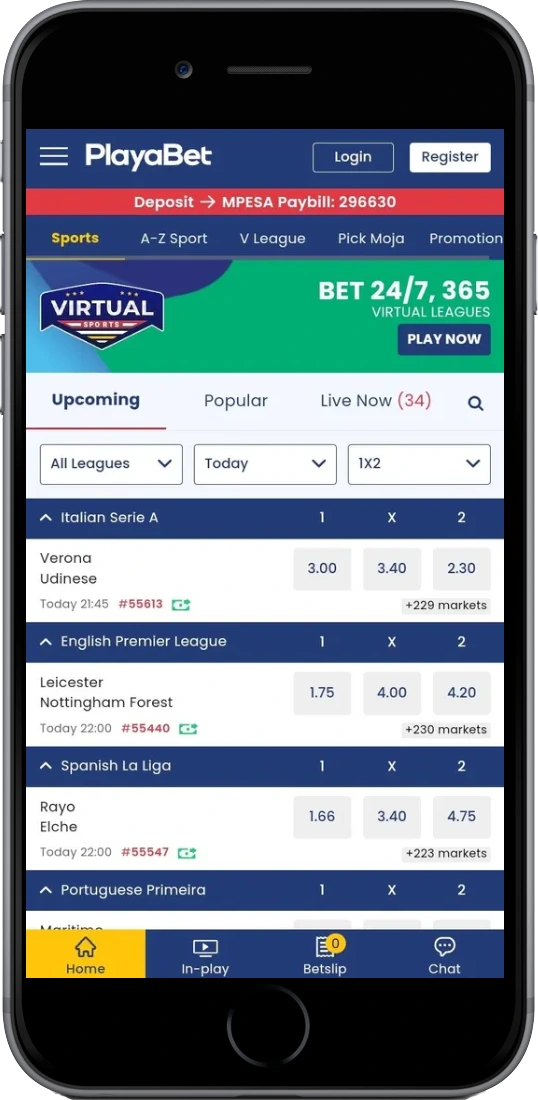
App specifications and system requirements
The Android APK is the main download option — Playabet Kenya is not on the Google Play Store, so you install it directly from the website. That's standard for licensed Kenyan betting operators; BCLB-regulated platforms distribute APKs this way because Google Play's gambling policies restrict direct listings in most African markets. The process is quick and safe as long as you download from the official site.
iOS users access the full platform through the mobile browser. Safari on iPhone handles the betting interface without issues — you get the same game library, the same M-Pesa payment flow, and the same live betting markets as the Android app. The main thing you lose is push notifications, since browser-based access doesn't support them on iOS. Add the site to your home screen from Safari's share menu and it behaves close enough to a native app for daily use.
Platform
Android APK
File size
42.05 MB
Android version
5.0 and above
Download cost
Free
Language
English
Payment in-app
M-Pesa, Airtel Money, Card
Casino in-app
Aviator, Slots, Live dealer
Sports in-app
Football, Basketball, Rugby
Licence
BCLB No. 0000427
iOS support
Mobile browser (Safari/Chrome)
Push notifications
Live score and bonus alerts
Compatible devices
Samsung, Huawei, Tecno, Infinix, Xiaomi
How to download and install the Playabet Kenya app
Because the APK comes from outside the Google Play Store, Android blocks unknown sources by default. You need to allow it once before installing — the setting takes about 30 seconds to change and you can turn it back off afterwards if you prefer.
Enable unknown sources
- Open Settings on your Android device.
- Go to Lock Screen and Security (exact name varies by phone model).
- Find Unknown sources or Install unknown apps and toggle it on.
- Tap OK on the warning prompt.
Download and install the APK
- On this page, tap Download APK Free.
- When the download finishes, tap Open in the notification bar.
- Tap Install in the installer window that appears.
- Wait 10–15 seconds for installation to complete.
- Tap Open — the Playabet Kenya app launches.
- Log in with your phone number and password, or tap Register if you're new.
Tecno and Infinix phones — the most common budget Android models in Nairobi and Mombasa — handle this without any issues. On some Huawei devices running EMUI 12+, the "Install unknown apps" setting is inside Settings → Apps → Special app access instead. Samsung Galaxy A-series phones, widely used in Kisumu and Nakuru, follow the standard path. If the installation fails on the first attempt, check that you have at least 80 MB of free storage — the app needs a bit of working space beyond the 42 MB file size.
Update the app by downloading a new APK from the same page whenever a new version is available. There's no auto-update function since it's not on the Play Store, so check back if the app starts throwing errors after a few months.
What you get in the Playabet Kenya app
The app covers the same content as the desktop site — nothing is cut down for mobile. Sports betting, crash games, live casino, deposits and withdrawals all work the same way. The interface is designed for one-handed use on a 6-inch screen, which covers most phones Kenyan players actually use. Below are the main features you'll interact with on a typical day.
Live sports betting
In-play markets on KPL, EPL, La Liga and more. Cashout available on selected live bets.
Aviator crash game
Spribe's Aviator with 97% RTP runs natively in the app. Auto cash-out settings work on mobile.
Slots and live casino
Full slot library from Pragmatic Play and Play'n GO. Evolution live dealer tables in real time.
M-Pesa deposits
Deposit via M-Pesa Paybill inside the app. Balance updates in under 2 minutes.
Push notifications
Live score updates and bonus alerts sent directly — no need to keep the app open.
Accumulator builder
Build multi-match accumulators across KPL, Champions League and NBA in a few taps.
Bet history
Full transaction and bet history with settlement details. Filter by sport, date or status.
Secure login
SMS OTP for account changes. Auto-logout after 30 minutes of inactivity on the app.
App vs mobile browser – which one to use
Both work. The difference comes down to speed and convenience on your specific device. Players in areas with slower 3G connections — parts of Kisumu, Nakuru outskirts, rural Rift Valley — report the installed APK loads betting markets about 1–2 seconds faster than a browser tab because the app shell is already cached locally. If you're on 4G in Nairobi CBD, the gap is smaller and either option is fine.
One thing the browser genuinely can't match: push notifications. If you want an alert when your accumulator settles or when a bonus lands in your account, you need the app. On the other hand, if you only bet occasionally and don't want to manage another app install, the mobile browser covers everything you need. Deposits via M-Pesa work identically in both. Withdrawal processing times are the same regardless of how you access the platform — 5–20 minutes to M-Pesa for amounts under Ksh 70,000.
| Feature | Android app (APK) | Mobile browser |
|---|---|---|
| Installation required | Yes (42 MB APK) | No |
| iOS compatible | No | Yes |
| Push notifications | Yes | No |
| Load speed (3G) | Faster | Slower |
| Full game library | Yes | Yes |
| M-Pesa deposits | Yes | Yes |
| Home screen shortcut | Auto icon after install | Manual (add to home screen) |